How to Make a Research Report with Bing Chat
Investigate new topics quick and easy


In this era of information overload, organizing your findings and presenting them effectively is crucial. If you are looking for a way to create a research report without spending hours on the internet, you might want to try Bing Chat.
On this page:
Prompt for Bing Chat
Here is a prompt to create a research report on any topic with Bing Chat:
{"Role":"Research Assistant", "Task":"Compile a comprehensive 'research report'. "Topic": 'your_topic_here'. "Include": relevant data, statistics, insights, and sources.", "Completion":"A detailed research report on 'your_topic_here' that covers the latest information, data, and analysis, providing valuable insights, and sources."}Replace your_topic_here (2x) with the subject of your research:

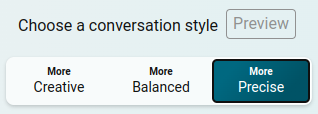
TIP: Use the more precise option, to make sure that the results are concise and factual:
Example
Save the research report
Click on the Export button to create a text, word, or pdf-file of your research report:


More prompts for Bing Chat
Visit my personal GitHub profile for more prompts.